Sage Oracle Touch Guide: Grind Settings, Milk and Cleaning
The Sage Oracle Touch grinds, doses and tamps a 22 g shot for you, then textures the milk while you watch. Sage and Breville have both discontinued it, but plenty of owners still pull shots on one every morning, and used machines keep turning up for sale. This guide covers setup, grind settings, milk, cleaning and the fixes for common problems.
Sage oracle touch guide, in short: To use the Sage Oracle Touch, fill the tank and hopper, lock the portafilter into the grinder cradle so it grinds and tamps a 22 g dose, then move it to the group head and choose a drink on the touchscreen. Sage has discontinued the Oracle Touch, but existing machines work as before.
Sage Oracle Touch Guide: Grind Settings, Milk and Cleaning
The Oracle Touch sits between a manual espresso machine and a one-button super automatic. It handles the messy steps and leaves you in charge of taste, which is why a few settings make a big difference.
Introduction to The Oracle Touch
The Sage Oracle Touch (BES990, sold as the Breville Oracle Touch outside the UK and Europe) is a dual boiler espresso machine with a built-in grinder, automatic tamping and an automatic steam wand. The machine combines high-end technology with user-friendly interfaces, offering both precision and convenience. This section will introduce you to the core features that make The Oracle Touch stand out from other espresso machines.
Key Features
The Oracle Touch is packed with features that make it an exceptional choice for espresso enthusiasts. Notable features include:
- Touch Screen Interface: Easy to handle and customize your coffee preferences.
- Dual Boilers: Enables simultaneous steaming and extraction, reducing wait times.
- Automated Grinding, Dosing, and Tamping: Ensures consistent quality every time.
- Adjustable Milk Frothing: Suitable for a variety of milk textures and temperatures.
- Customizable Drinks Menu: Save and replicate your favorite coffee drinks.
Why Choose The Oracle Touch?
You should consider The Oracle Touch if you value a balance between automation and control. It automates grinding, dosing, tamping and milk texturing, while still letting you adjust grind, shot volume and milk to taste.
Setting Up Your Oracle Touch
Setting up your machine correctly is key for ensuring optimal performance and longevity. Follow these steps to get started.
Unboxing and Initial Setup
Upon unboxing your Oracle Touch, you will find several components that need assembly. Carefully unpack and verify that all parts are present.
- Assemble Components: Attach the portafilter, filter baskets, and water reservoir.
- Fill the Water Tank: Use fresh, filtered water to fill the tank located at the back of the machine.
- Install Water Filter: This helps to reduce impurities and scale build-up.
Powering On and Configuration
Power up the machine and follow these steps for initial configuration:
- Turn On the Machine: Press the power button and wait for the touch screen to activate.
- Select Language and Settings: Choose your preferred language and configure initial settings such as water hardness.
- Perform a Quick Flush: Run a cycle of hot water through the machine to clean any residues.
Understanding the Touch Screen Interface
The touch screen interface is user-friendly and intuitive, designed to simplify your coffee-making process.
Main Menu
The main menu provides options for different coffee drinks, settings, and maintenance.
- Drinks Menu: Choose from espresso, long black, latte, flat white, and more.
- Settings: Adjust parameters such as water temperature and shot volume.
- Maintenance: Access cleaning cycles and alerts for descaling.
Customizing Your Drinks
One of the key strengths of The Oracle Touch is its ability to save and customize your favorite drinks.
- Select a Drink: Choose your preferred coffee style from the drinks menu.
- Adjust Parameters: Modify shot volume, milk temperature and milk texture.
- Save Customization: Save your settings for future use, making it easy to replicate your favorite beverages.
Grinding, Dosing, and Tamping
The Oracle Touch automates many of the detailed tasks involved in making the perfect espresso. Here’s how you can take full advantage of these features.
Automatic Grinding
The integrated grinder ensures that your coffee grounds are always fresh and consistent.
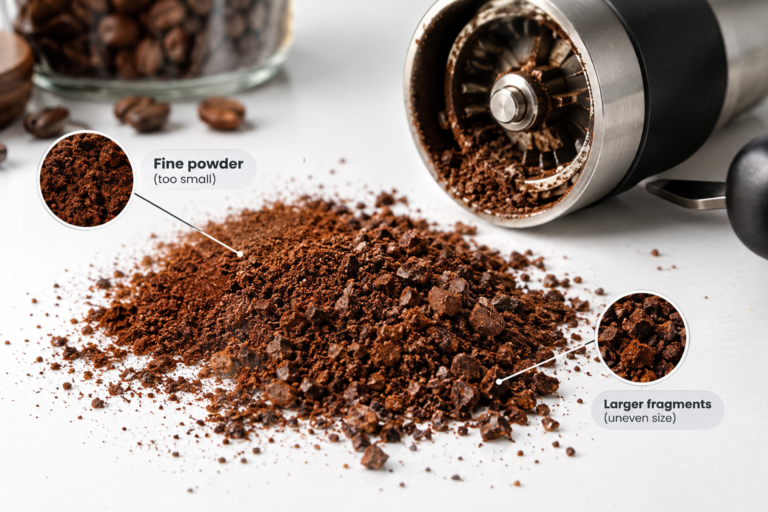
- Select Grind Size: Set the grinder’s grind size control. It has 45 settings, and lower numbers grind finer.
- Insert Portafilter: Place the portafilter into the grinder cradle.
- Start Grinding: The machine will automatically grind and dose the coffee into the portafilter.
Dosing and Tamping
Consistent dosing and tamping are essential for high-quality espresso.
- Auto Dose: The machine measures the exact amount of coffee needed.
- Auto Tamp: Ensures the grounds are evenly compacted, which is critical for even extraction.
Extracting the Perfect Espresso
Extraction is the core of espresso making. This section will cover how to extract the perfect espresso shot using The Oracle Touch.
Pre-Infusion
The Oracle Touch uses a pre-infusion process to ensure even extraction.
- Low Pressure: Water is applied at low pressure to gently expand the coffee grounds.
- Extraction: After pre-infusion, the machine increases pressure to extract the full range of flavors from the coffee.
Shot Control
You can control shot volume and extraction time to tailor your espresso.
- Single or Double Shot: Choose between a single or double shot, or customize the volume.
- Manual Override: If desired, override presets to adjust extraction time in real-time.
Milk Frothing Techniques
Frothing milk to the perfect texture is an art, but The Oracle Touch makes it easier with its automated frothing capabilities.
Automatic Frothing
The Oracle Touch automates the frothing process but allows for customization based on your preferences.
- Fill the Jug: Fill the stainless jug with cold milk to the line for your drink.
- Choose Texture: Adjust the milk texture to suit your drink of choice, whether it’s a cappuccino or a flat white.
- Set Temperature: Select a milk temperature between 40°C and 75°C.
Manual Frothing
For those who prefer a hands-on approach, The Oracle Touch also offers manual frothing options.
- Manual Override: You can take control of the frothing wand and manually adjust texture and temperature.
- Frothing Tips: Practice techniques like swirling and tapping to achieve microfoam.
Cleaning and Maintenance
Regular cleaning and maintenance are vital for keeping your machine in top condition. The Oracle Touch includes several automated cleaning cycles to simplify this process.
Daily Cleaning
Perform basic cleaning routines daily to maintain hygiene and performance.
- Flush System: Run a quick flush of hot water through the group head and steam wand.
- Empty Drip Tray: Regularly empty and clean the drip tray to prevent overflow.
Weekly Maintenance
A more thorough cleaning should be conducted weekly.
- Clean Group Head: Use a cleaning brush to remove coffee residues.
- Soak Portafilter and Basket: Soak in a solution of water and coffee cleaner.
Monthly Descaling
Descaling prevents mineral build-up, which can affect machine performance.
- Prepare Descale Solution: Follow the manufacturer’s instructions to prepare the descaling solution.
- Run Descale Cycle: Choose the descale option from the maintenance menu.
- Rinse Thoroughly: Ensure all descaling solution is rinsed out before resuming normal use.
Troubleshooting Common Issues
Despite its advanced technology, you may encounter occasional issues with The Oracle Touch. Here’s how to address some common problems.
Inconsistent Grind Size
If your grinder is producing inconsistent particles:
- Check Burr Adjustment: Ensure the grinding burrs are correctly adjusted.
- Clean Grinder: Remove any trapped coffee grounds that might be affecting grind consistency.
Poor Extraction
If your espresso shots are watery or bitter:
- Adjust Grind Size: A finer grind may improve extraction.
- Check Dosing: Ensure the correct amount of coffee is being used.
Milk Frothing Issues
If the milk is not frothing properly:
- Check Steam Wand: Ensure it is clean and free from blockages.
- Adjust Milk Temperature: Experiment with different milk temperatures.
Frequently Asked Questions (FAQs)
Can I use pre-ground coffee with The Oracle Touch?
Sage built the Oracle Touch around its grinder and automatic tamping, so whole beans in the hopper give the most consistent results. Check your manual before loading pre-ground coffee by hand.
How often should I replace the water filter?
Replace the water filter every three months, and sooner in very hard water.
Is it possible to make iced coffee drinks with The Oracle Touch?
While the machine is primarily designed for hot coffee beverages, you can prepare a strong espresso shot and pour it over ice to make iced coffee.
Expert Tips and Tricks
Here are some advanced tips to get the most out of your Oracle Touch.
Pre-Heating the Cup
Pre-heating your cup can significantly impact the flavor of your espresso. Use hot water to warm the cup before brewing.
Timing Your Shots
Use a timer to check the extraction time. Optimal shots typically range from 25 to 30 seconds.
Experimenting with Beans
Different coffee beans produce different flavors. Experiment with various beans to find your perfect cup.
Mastering Latte Art
With practice, you can use the milk frothing wand to create beautiful latte art. Start with simple designs and gradually progress to more complex patterns.
2026 Update: The Oracle Touch Is Discontinued
Sage has discontinued the Oracle Touch. Its UK product page now reads “This model has been discontinued,” and Breville’s US page for the same machine, sold there as the Breville Oracle Touch, says the same. Breville’s page still points owners to support, and everything in this guide applies to machines already on the counter.
If you are buying one used, ask for the date of the last descale, check that the grinder runs without grinding noises or stalls, and run the steam wand for 30 seconds to confirm it builds steady pressure. A machine that has never been descaled in hard water is a repair bill waiting to happen.
If you want a new machine from the same family, the closest current model in Sage’s range is the Oracle Jet, listed at £1,499.95 (down from £1,699.95) in September 2026. It swaps the dual boilers for a ThermoJet heating system, keeps 45 grind settings and a 22 g dose in a 58 mm portafilter, and adds milk settings for dairy, soy, almond and oat, plus Cold Brew and Cold Espresso drinks.
Oracle Touch Specs Worth Knowing
| Feature | Sage Oracle Touch (BES990) |
|---|---|
| Grinder | Built in, 45 grind settings |
| Dose | 22 g, dosed and tamped automatically |
| Extraction | Low pressure pre-infusion, then 9 bar |
| Heating | Dual boilers, so you can brew and steam at once |
| Milk | 40°C to 75°C, 9 texture levels |
| Saved drinks | Up to 8 personalised coffees |
| In the box | Includes a water filter holder and water filter |
| Status | Discontinued by Sage and Breville |
That 22 g dose is larger than many home recipes, so a 1:2 ratio means about 44 g of espresso in the cup. If shots taste thin in milk drinks, pull shorter rather than finer first.
Dialing In the Oracle Touch in Four Shots
- Pull a double and time it from the moment the first drops appear. Aim for 25 to 30 seconds.
- Fast and sour means finer. If the shot runs under 25 seconds, go two grind settings finer, grind a fresh dose, and pull again.
- Slow and bitter means coarser. If it runs over 30 seconds, go two settings coarser. Change grind by small steps; the machine tamps the same way every time, so grind is your main control.
- Save it. Once a shot tastes right, save the drink to one of the eight profiles so the next person in the house gets the same cup.
A new bag of beans usually needs one or two more adjustments, even from the same roaster.
If you are shopping for a replacement, our best espresso machine with grinder guide covers built-in grinder models, the best super automatic espresso machine guide covers one-touch options, and our coffee machine descaling guide explains how often to descale by water hardness. For more reviews and brewing guides, visit the Coffee Rank IQ homepage.
Conclusion
The Oracle Touch does the repetitive work of espresso for you, so your job is small: set the grind, taste the shot, save the drink, and keep up with cleaning and descaling. Do that and a discontinued machine will keep making excellent coffee for years.
When it does come time to replace it, the Oracle Jet is the closest model Sage sells today.
Keep Exploring Coffee Rank IQ
- Coffee Rank IQ home: reviews, brewing guides, and coffee science
- Best Super Automatic Espresso Machine: Read the Cleaning Specs First
- Best Milk Frother for Lattes at Home: Handheld vs Electric
- What Is a Cafe au Lait? Coffee and Milk the French Way
- Best Milk Frother for Lattes at Home: Handheld vs Electric